Domain Lifecycle: Expiration, Grace Period, Redemption and Drop
What really happens after a domain expires: grace period, registrar auctions, 30 days of redemption, pending delete and the drop, now at 12:00 UTC for .com. Real dates for .com, .uk, .de, .eu, .ca and .au, how to get your domain back at each stage and how to track names worth catching.
 DeepScan.pro
Every domain is paid up to a certain date, and most owners only remember that date once the site is already down. For anyone who buys expired domains, the same dates work the other way round: they tell you when a name will hit an auction, when it drops and how many people will be fighting for it.
This is the domain life cycle explained the way I use it in practice: what happens on each day after a name runs out, how the dates differ between .com, .uk, .de and other zones, how to get your domain back at each stage, and how to track the names you want to catch.
Dates and rules below are checked against the official help pages of zone operators and registrars as of October 2026. Timelines do change, so open your provider's current page before you act on a valuable name.
The Stages of a Domain Lifecycle at a Glance
Two players run the lifecycle of a domain. The registrar is the company you pay: GoDaddy, Namecheap and so on. The registry runs the whole zone, for example Verisign for .com. The first one decides what happens in the weeks after expiration. The second one runs the final stages and the deletion itself.
Here are the stages that a domain goes through, using a typical gTLD domain (a generic extension such as .com, .net or .org) as the example:
| Stage | Days after expiration | Domain status | Site works? | Who can get it back | Cost |
|---|---|---|---|---|---|
| Active domain | Until the paid term ends | ok, clientTransferProhibited | Yes | Owner | Normal renewal fee |
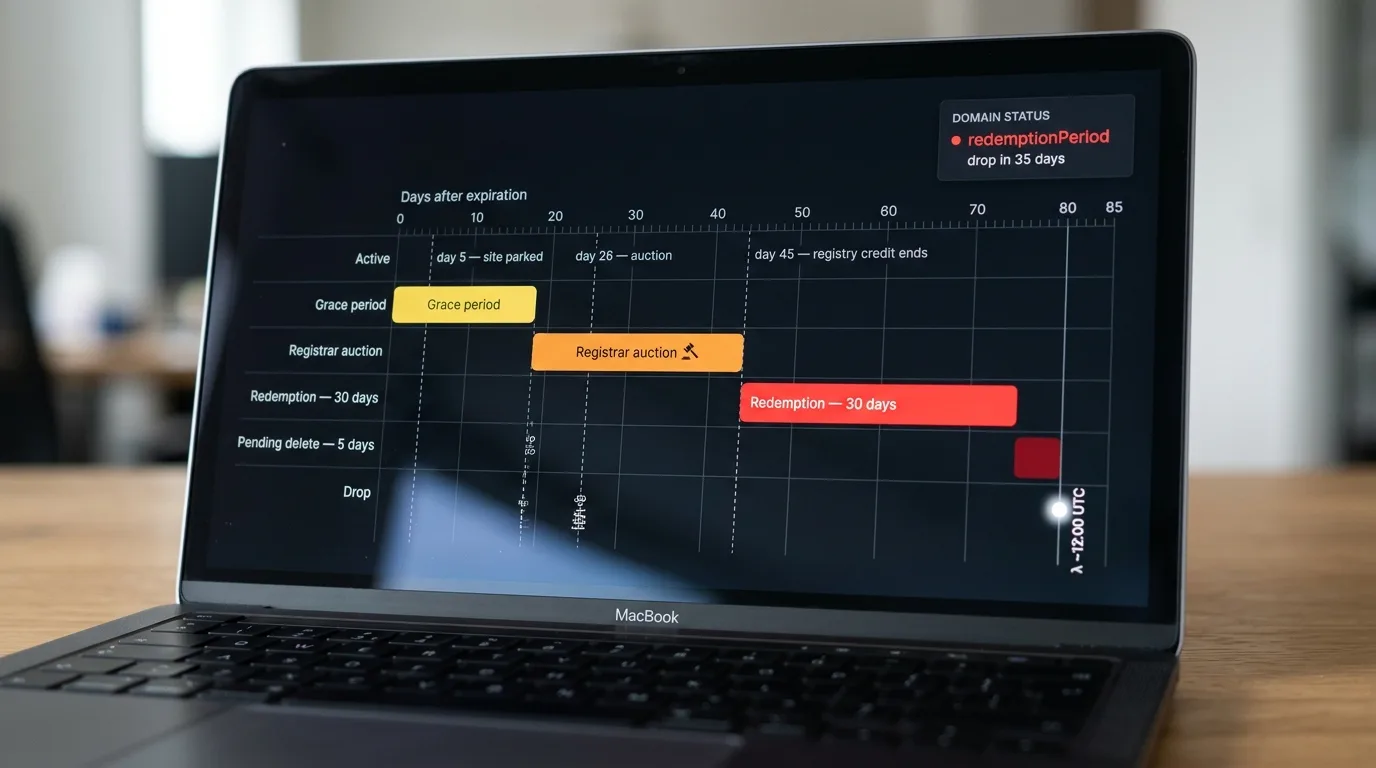
| Grace period | 0 to 30–45 | autoRenewPeriod | Usually stops around day 5 | Owner | Normal price, at some companies a fee later |
| Registrar auction | About 26–43 | autoRenewPeriod | No | Owner, until the first offer | Same as above |
| Redemption | About 45–75 | redemptionPeriod | No | Only the last owner, via the same provider | Renewal + restore fee |
| Pending delete | About 75–80 | pendingDelete | No | Nobody | — |
| Drop | Usually around day 80 | Not found | — | Anyone | Registration or catch price |
You can see the status of any name for free at lookup.icann.org. It uses RDAP, the newer protocol that replaced WHOIS for generic zones in January 2025.
Don't trust the end date in a lookup. On the day a .com runs out, the registry automatically extends it for a year and bills your provider. So a week later, the lookup shows next year's date while the site is already parked. Look at the status, not the date.
Your provider then has 45 days to give the name up and get that money credited back. That's why nobody holds an unpaid .com past day 45, and why GoDaddy's auctions of these names end on day 43. Understanding the domain status saves more money than any paid tool.
Active Domain: Registration Period and Renewal
When you register your domain, you choose the registration period for the initial registration: from 1 to 10 years. The domain is registered to you as the domain owner for exactly that term. Before it ends, you need to renew the domain name, or the countdown described below begins. The domain registration process takes a minute; the rules for what happens after expiration are what you actually sign up for. ICANN requires registrars to publish their renewal, late-payment and restore prices, so read them before you pay for the domain name registration, not after a problem.
A few things here save a lot of trouble later:
- Auto-renew is not a guarantee. It fails on an outdated card, an empty balance or a glitch on the provider's side. In 2025 the former owner of blockchain.ai said his auto-renew failed, the name sold at auction for $405,000, and he went to court. These are his claims, not a ruling, but they show what one failed charge can cost.
- Some zones have their own minimum terms. At Namecheap, for example, .ai can only be extended for 2 years or more, never for just 1.
- Domain transfers usually add a year. If you transfer your domain to another domain registrar, a one-year domain renewal is normally included in the price. While the domain is active, moving it costs you nothing extra, so move the domain before it expires, not after.
For a money site, pay for 5–10 years at once. The price per year is the same, and you stop living from one deadline to the next.
Domain Expiration and the Grace Period
When the domain expires, it doesn't vanish. For generic zones (.com, .net, .org, .info and the new extensions), ICANN's recovery policy for lapsed names (ERRP) sets the minimum rules:
- two reminders before the end of the term, about a month and about a week ahead, plus one more within 5 days after;
- before deletion, the DNS must be cut off for a while, so the owner sees the site is down;
- a 30-day redemption grace period after deletion.
Everything else is up to the company you pay. The grace period, when the domain remains in your account and you can still pay the normal price, can last anywhere from 0 to 45 days. Here is how GoDaddy, the largest registrar, handles a .com, according to its help pages:
- Day 5: the site and email stop working, a parking page appears.
- Day 12: the last automatic charge attempt.
- Day 18: the normal price ends. From here, recovery costs an extra fee (GoDaddy's own guide mentions $80).
- Day 26: the name is listed in GoDaddy's auction for 10 days.
- Day 30: if someone has placed an offer, the owner can no longer pay to keep the name.
- Day 37: a final closeout sale for 5 days.
- Day 43: all sales end. An unsold domain name goes back to the registry.
Namecheap gives about a month at the regular price, then about a month of redemption with a fee on top. Its help pages say unrecovered names are released 80–85 days after expiration.
The most common way to lose a name: the email of your registrar account sits on the same domain (you@yourbrand.com). Around day 5 the DNS stops, mail stops with it, and every "your domain has expired" notice goes nowhere. Keep the account email on a separate address.
Registrar Auctions Before the Drop
Between days 26 and 43, many companies sell the lapsed name on their own auction or a partner's. For buyers this is the most valuable window. The winner gets the existing registration, so the domain name's creation date stays the same. After the drop, the domain becomes a brand-new registration and the date resets.
There is a second plus that people forget. A name bought at this stage goes back online about a month earlier than one caught at the drop. That means fewer weeks of a parking page in Google's eyes and fewer pages falling out of the index.
Redemption Grace Period: The Last Chance
If the domain is not renewed and nobody buys it, the domain name is deleted from the account. From that day, the domain enters the redemption period at the registry. The domain redemption period lasts 30 days, with the status redemptionPeriod. The site and email are dead, and the rules are strict:
- Only the last owner can reclaim the domain.
- It goes through the same registrar. The domain name cannot be transferred during redemption.
- You pay the renewal plus a restore fee. Most retail companies charge $80–$200 on top, depending on the domain extension, and they pay their own fee upstream, so don't expect it to be waived.
- After you pay, the status can show pendingRestore for up to 7 days while the request is processed. That's normal.
For a small PBN site with no brand behind it, compare the restore fee with the price of a backorder before you pay. If nobody else wants the name, catching it at the drop can cost less. For a business site, never gamble: pay the fee and keep the name.
Pending Delete: When the Domain Is Released
After 30 days in redemption, the domain moves to pending delete for 5 days. Nothing saves it at this point, not the owner and not support. On the fifth day the domain is deleted by the zone operator. From that second, the domain is available for registration to anyone.
Since October 1, 2026, Verisign starts dropping .com and .net names at about 12:00 UTC; before that, it happened in the evening UTC. Catching services moved their deadlines too: DropCatch takes .com and .net orders until 11:30 UTC on drop day, SnapNames and NameJet until 15 minutes before the drop. An order placed at lunchtime is an order placed too late.
The drop date math is simple:
- status is pendingDelete → the day it was set + 5 days;
- status is redemptionPeriod → the day it was set + 35 days.
The "last changed" date in RDAP usually shows when the current status appeared. Once you know it, you know the exact day the domain will become available.
Domain Expiry by Zone: When the Name Really Drops
Country-code zones (ccTLDs) don't follow ICANN's rules, and this is where most mistakes happen. Each top-level domain sets its own timeline, so the same lapsed status can mean a 90-day wait in one zone and a release tomorrow in another.
| Zone | After the term ends | Recovery window | When it's free | How to track |
|---|---|---|---|---|
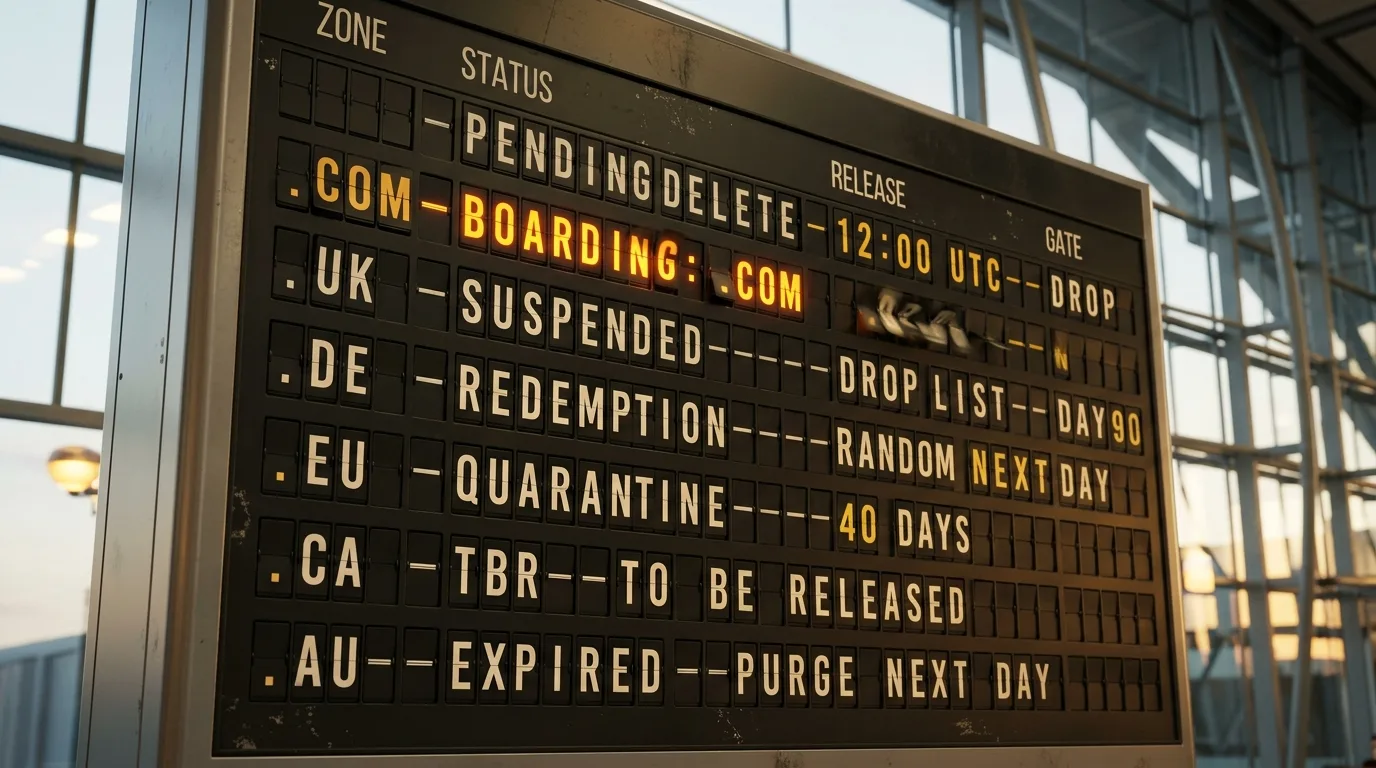
| .com, .net | 0–45 days, depends on the company | A month of redemption + 5 days | Drop day, about 12:00 UTC | Status in RDAP |
| .org, .info, new gTLDs | Same structure | Same | Each zone sets its own drop time | Status in RDAP |
| .uk | Normal price for a month, then suspended | Until day 90, backdated to the old date | After day 90, at the time in Nominet's daily drop list | The drop list: WHOIS shows the name as taken until the domain is fully purged |
| .de | No grace at the zone level; your provider decides when to delete | A month, free at DENIC, only for the last holder | At a random time on the next day | DENIC status |
| .eu | Deleted names go into a 40-day quarantine | Through your provider during quarantine | First come, first served after quarantine | EURid lookup shows the exact release date |
| .ca | Grace up to 45 days, often a month | A month of redemption, then 5 days | Through CIRA's To Be Released (TBR) list | TBR list |
| .au | Can be renewed for about a month, already off DNS | — | The day after it appears on auDA's drop list | auDA drop list |
| .io | Close to generic zones at most providers | Redemption around days 45–75 | About 90 days after the term ends | Ask your provider |
| .ai | Set by the company you pay; lapsed names go to Namecheap auctions | Depends on the provider | If unsold at auction | Namecheap auctions |
Country zones change their rules more often than generic ones: .uk rebuilt its drop in 2022, and .au moved to new rules in April 2026. Before planning a catch or counting on extra days, open the zone operator's own page.
Domain Expired? How to Get It Back
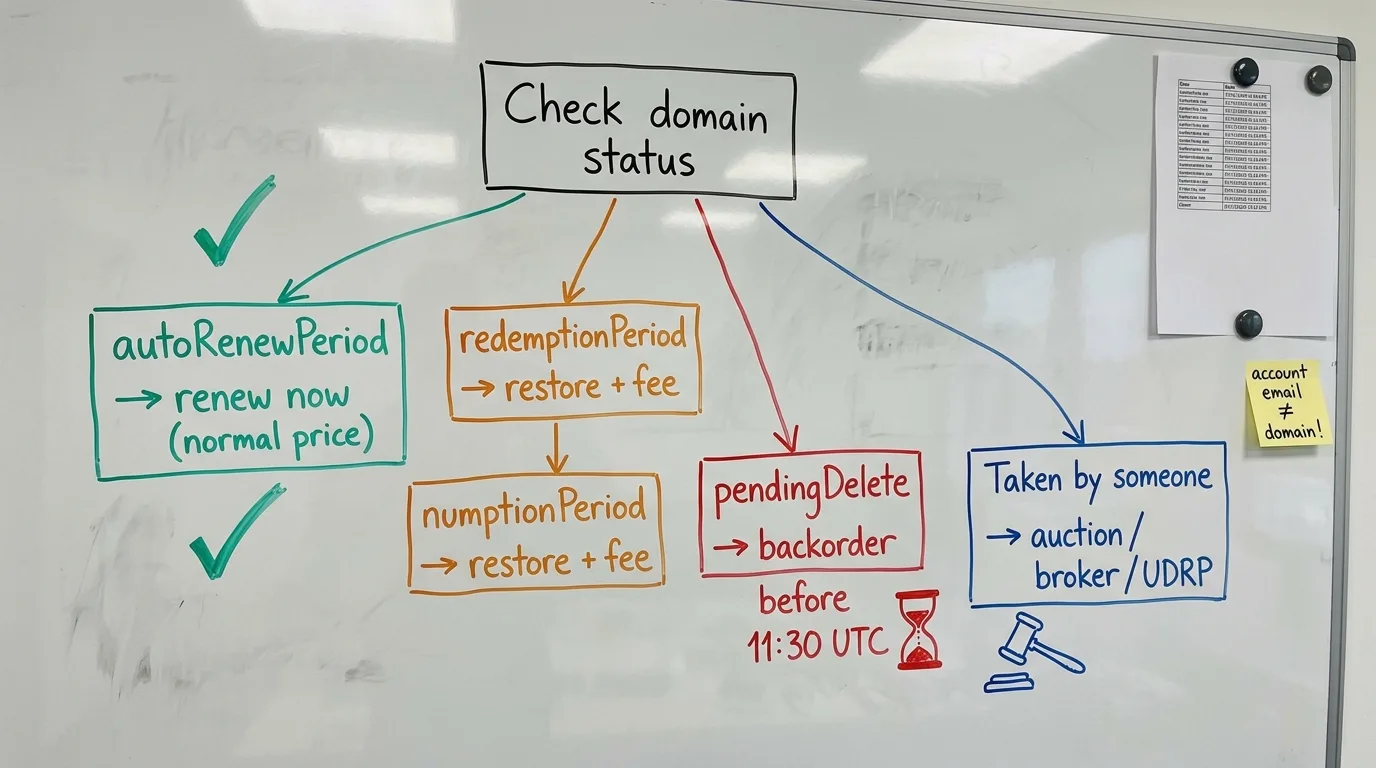
"My domain expired, how do I get it back?" and "How do I get my domain name back if someone took it?" are the questions I hear most from friends with sites. The answer depends on one thing: the current status. Look it up first, in your account or at lookup.icann.org, then follow the line that matches:
- Status autoRenewPeriod, site parked. The domain is still yours. Log in and renew your domain at the normal price. If the card failed, update it and pay by hand instead of waiting for the next automatic try.
- You can't get into the account. Recover your domain through your provider's support with ID. If a freelancer or a former employee registered it, what matters is who is listed as the registrant, so ask support how to prove the name is yours.
- The name is up for auction. At GoDaddy you can still pay on days 26–29 even with offers on it. From day 30, an active offer blocks you, so don't wait.
- Status redemptionPeriod. Restore it through the same company: renewal plus restore fee. At many of them this is a separate "restore" button or a support request.
- Status pendingDelete. The domain is no longer recoverable. Place backorders at several catching services before 11:30 UTC on drop day and compete like everyone else.
- Someone else already registered it. See below.
Getting Your Domain Name Back From a New Owner
This is the hardest version of "how to get my domain name back", because the name is now someone else's registration. If a catching service took it, it often goes to that service's auction within days, and you can bid there like anyone else. If an investor already holds it, write through a broker or a neutral email address. If they see your brand's address, the price goes up.
The legal route, a UDRP complaint, only works if you own a trademark and the new holder uses the name in bad faith. WIPO fees start at $1,500, and losing a name because you didn't pay is not bad faith on their part.
If your name gets listed in an auction while you can still pay, pay at once. An offer gives the bidder no rights until the auction closes, and your payment takes the name off sale.
Domain Management: Avoid Losing Your Domain
Good domain management is boring, and that's the point. When a domain is due to expire, nothing should depend on luck. This is what I set up for every name that earns money:
- Auto-renew on, with a backup card in the account.
- Account email on a separate address (see the warning above) and two-factor login everywhere.
- All names in accounts you own, not in a freelancer's or an agency's account. Managing your domain through someone else's login is the fastest way to lose it in a conflict.
- Your own reminders 60, 30 and 7 days before each domain expiry date, on top of the provider's emails.
- Registrar lock on (clientTransferProhibited), so nobody can quietly move the name.
- Ignore "renewal invoices" from companies you never used. Fake renewal notices, known as domain slamming, trick owners into moving the name to an overpriced registrar.
That's enough to keep your domain for as long as you need it. If you don't renew your domain name on purpose, for example after a test project, close the linked accounts first. A unique domain with your old email on it is a password-reset key for whoever catches it next.
How to Track Expiring Names You Want to Catch
Now the other side of the domain name lifecycle. When you build a PBN or hunt for names with strong links, these stages are your calendar. Here is how I keep it:
- Know where the name will be sold. The registrar field in RDAP tells you the route. GoDaddy and around 30 partners (Enom, Tucows, Name.com, Squarespace and others) list names on GoDaddy Auctions around day 26. Network Solutions, Register.com and other Newfold brands send them to NameJet and SnapNames. Dynadot and Namecheap run their own sales. Whatever is left goes to the drop, where catchers race to register the domain in the first seconds.
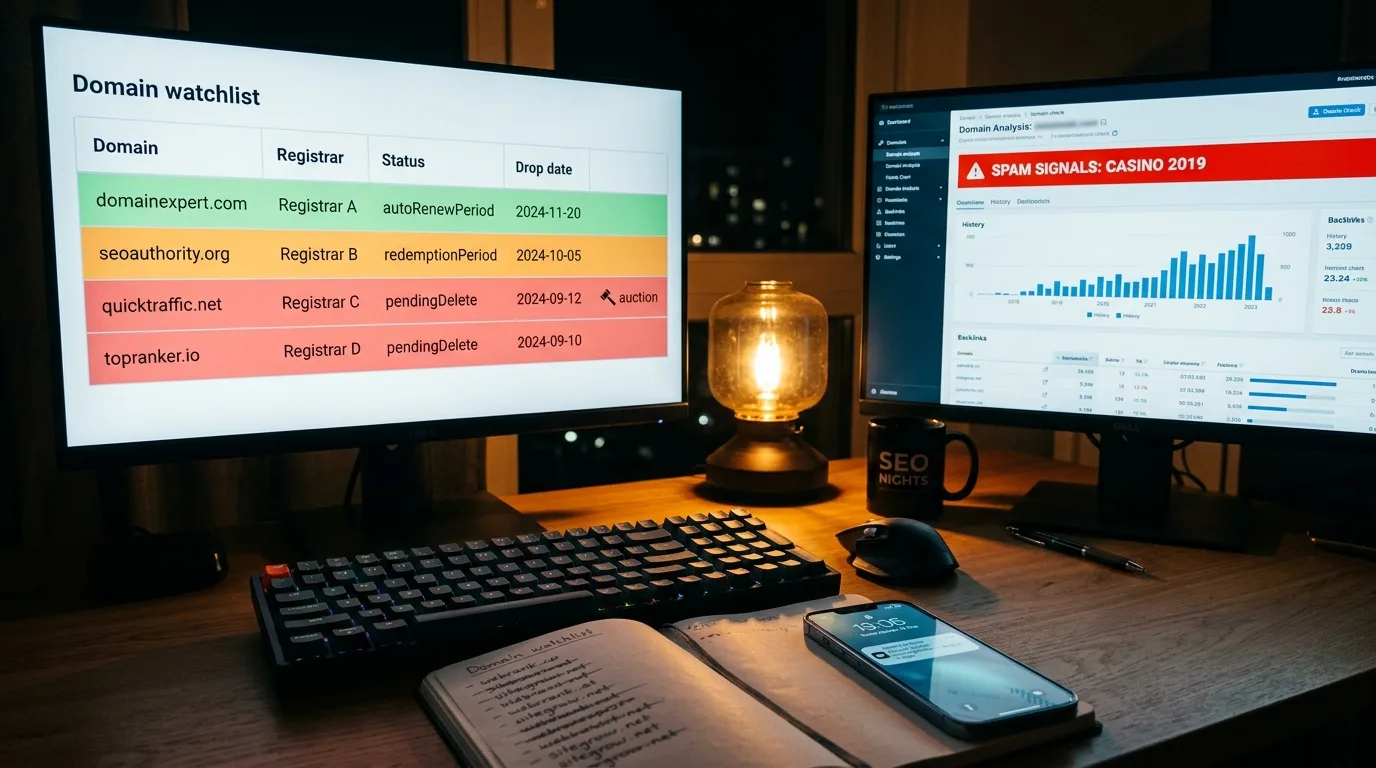
- Keep a watchlist. A simple sheet of names that expire in the next 90 days: name, registrar, end date, status, expected drop day. Update statuses daily; a small script that checks RDAP once a day is enough. The change from autoRenewPeriod to redemptionPeriod gives you the exact drop date 35 days ahead.
- Use public lists. ExpiredDomains.net sorts names by stage, SnapNames publishes a daily list of names about to drop, Nominet publishes the .uk drop list, and the EURid lookup shows .eu release dates.
- Order early. For a valuable name, use several catchers at once. With .com now dropping around noon UTC, set your reminders for the morning, not the evening.
Lists only give you names, and most of them are junk. Before any money moves, I run the shortlist through deepscan.pro to check expired domains before buying: the site history by year, links and spam signals in one report. That way the bad ones are out before the auction even starts.
How to Check an Expired Domain Before Buying
- Hold statuses. clientHold or serverHold on a name that hasn't run out usually means a suspension for spam or phishing. Skip it.
- Repeat drops. A fresh creation date with years of sites in the archive means the name was dropped and caught again, maybe several times. Check what was on it each time.
- Topic history. Casino, pharma or adult pages in the past, or a sudden switch to another language, are a red flag.
- Links. Anchors should match the old topic, and links should come from real sites, not from a network of spam blogs.
- Index. A site: search shows what Google still keeps. A domain without a single indexed page after a long parked period has usually lost most of its value.
- Trademark. A well-known brand name invites a UDRP complaint, whatever you build on it.
White, Grey and Black Ways to Use the Timeline
- White. Buy at the auction before the drop to keep the original registration and creation date, and rebuild the same topic. A trick few people use: write to owners whose sites went dark in the first two weeks (the contact page of the old site usually still works in the archive) and offer to buy the name before it reaches the auction. Many have already decided to let it go and will sell cheaply: they pay the normal renewal, you pay them, and the name moves to your account with its history intact. You skip the competition completely.
- Grey. Catch dropped names for a PBN. Pick the zones where the timing works for you: in .de the release time is random, so steady checking beats a big budget; in .uk the drop time is published in advance, so you know the exact minute.
- Black, and only with care. Taking a dead company's name to ride its traffic. You will also receive its old emails and password resets, and using them is illegal in most countries, not SEO. Since March 2024, Google's spam policy calls out "expired domain abuse": an old name used mainly to push low-value content. Churn-and-burn sites live by these rules for weeks, not years, so keep them far away from your money sites.
Domain Name Life Cycle: Key Points
The life cycle of a domain in five lines:
- The status matters; the date in a lookup doesn't.
- For a .com: fees at some companies from day 18, auctions on days 26–43, the name leaves the account before day 45, then a month of redemption and 5 final days before the drop.
- Since October 1, 2026, .com and .net drop at about 12:00 UTC. Order by 11:30 UTC.
- Country zones live by their own rules: check the .uk drop list, the .eu release date and the .de redemption status.
- Keep the account email on a different address, and every other risk becomes manageable.
Comments
Sign in to leave a comment
No comments yet — be the first.